

The left-hand menu has four headings. Menu is there for everyone who is signed in. Patients and Team are the clinic tools, on the Clinic plan and trials. Managers is for people who run the clinic.
-
Menu
These are the everyday links:
- Home — start a consult, dictate a letter yourself, open My letters, or open AI & privacy.
- Start consult — asks how you are seeing this patient: in person or by phone, or online.
- My letters — drafts, transcripts and recordings for consults you can open.
- Letter templates — shared letter types, your writing preferences, and custom types when the clinic has them switched on.
- AI & privacy — the in-app page for clinic staff. The public account is on How we handle your patients’ data.
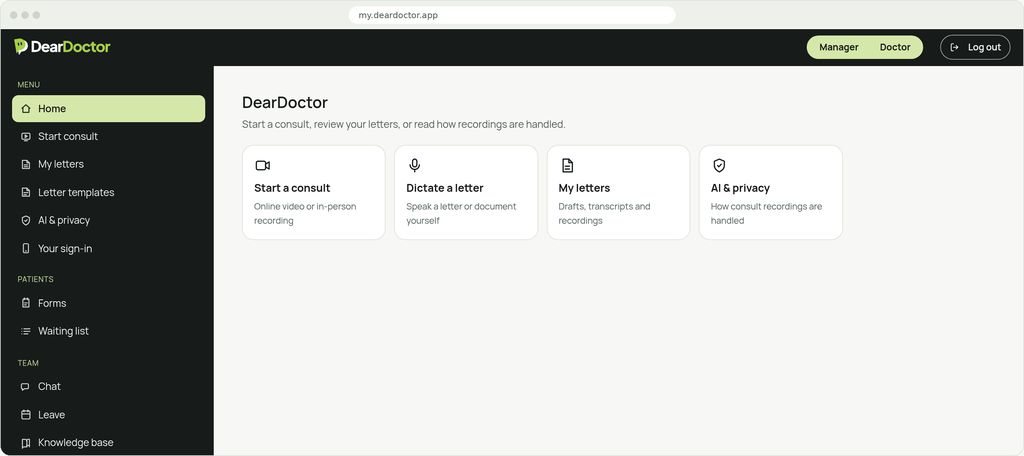
Home after signing in, with Menu, Patients and Team in the left-hand menu. Fictional demo clinic. Not a real patient or clinic record. -
Patients
On the Clinic plan, Patients has two items:
- Forms — available on Clinic and trials, in this menu with Waiting list. It is live in the clinic portal at my.deardoctor.app/forms. Free forms (new patient, follow-up) work. A paid script, letter, or test request still shows “Online payment isn’t set up” until the clinic connects its own Stripe. DearDoctor charges a 2.5% platform fee (plus GST) on each online payment for forms and scripts, in addition to card fees. The fee is taken from the clinic’s takings. It is not added to the patient’s price.
- Waiting list — the clinic’s current clinician seats. It is not the screen where a patient waits until you admit them to a video consult.
-
Team
On the Clinic plan, Team has three items:
- Chat — a messenger for clinic staff, not patient-facing. Chat is available on Clinic and trials, in the Team menu with Leave and Knowledge base. It is live in the clinic portal at my.deardoctor.app/chat. Don’t put patient details in chat.
- Leave — staff leave, including New Zealand public-holiday blocks.
- Knowledge base — available on Clinic and trials. It is live in the clinic portal at my.deardoctor.app/kb.
-
Managers
People who run the clinic see a Managers heading:
- People, then User accounts — clinic users. See People.
- Letter settings — letterhead, sign-off, tone, spelling, and the default letter type.
- Billing — the published plan prices. See Billing.
A manager can switch between a manager view and a doctor view. The manager home gathers the same jobs: start a consult, dictate a letter, My letters, People, and AI & privacy.
-
Dictate a letter
Home also has Dictate a letter. That is you speaking a letter or document yourself. It is separate from a consult recording. A consult letter is still drafted after the consult, and you still review it.